General Component
The General Policy Component allows you to change basic behavior and restrictions on managed devices. These settings control things like screen behavior, microphone access, updates, and system time.
Use this component when you want to configure how a device behaves on a daily basis.
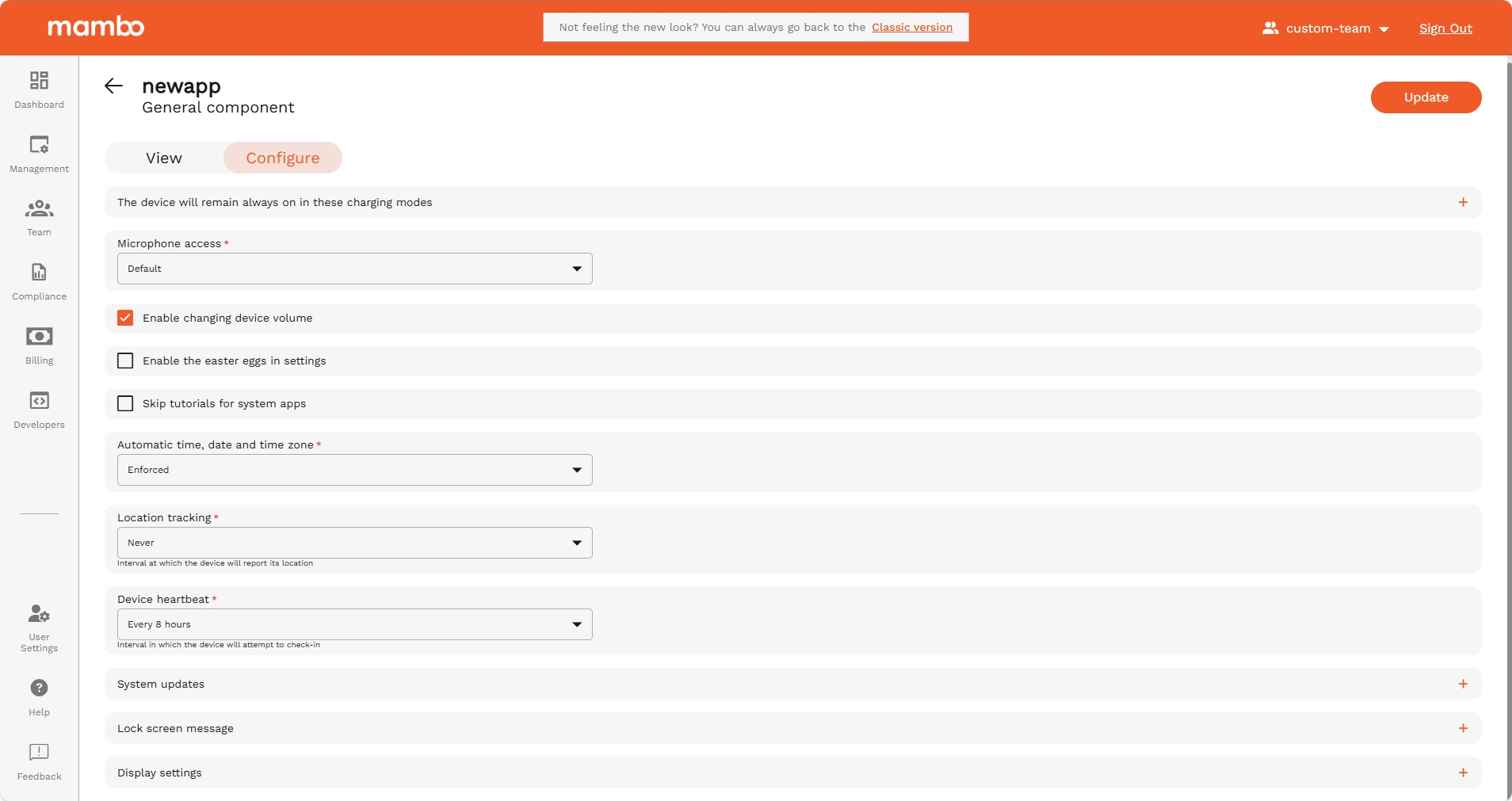
The device will remain always on in these charging modes
API reference: stayOnPluggedModes
Type: Array<enum>
The battery plugged in modes for which the device stays on. When using this setting, it is recommended to clear maximumTimeToLock so that the device doesn't lock itself while it stays on. Modes for plugging in the battery.
Options
| Option | Enum | Description |
|---|---|---|
| Outlet | AC | Power source is an AC charger. |
| USB charging | USB | Power source is a USB port. |
| Wireless charging | WIRELESS | Power source is wireless. |
Microphone Access
API reference: microphoneAccess
Type: enum
Controls the use of the microphone and whether the user has access to the microphone access toggle. This applies only on fully managed devices. On fully managed devices, controls the use of the microphone and whether the user has access to the microphone access toggle. This setting has no effect on devices which are not fully managed. The microphone access toggle exists on Android 12 and above.
Options
| Option | Enum | Description |
|---|---|---|
| Default | MICROPHONE_ACCESS_UNSPECIFIED | This is equivalent to user choice. |
| User choice | MICROPHONE_ACCESS_USER_CHOICE | This is the default device behaviour: the microphone on the device is available. On Android 12 and above, the user can use the microphone access toggle. |
| Disabled | MICROPHONE_ACCESS_DISABLED | The microphone on the device is disabled (for fully managed devices, this applies device-wide). The microphone access toggle has no effect as the microphone is disabled. |
| Enforced | MICROPHONE_ACCESS_ENFORCED | The microphone on the device is available. On devices running Android 12 and above, the user is unable to use the microphone access toggle. On devices which run Android 11 or below, this is equivalent to MICROPHONE_ACCESS_USER_CHOICE. |
Enable changing device volume
API reference: adjustVolumeDisabled
Type: boolean
Controls whether users can adjust device volume. Whether adjusting the master volume is disabled. Also mutes the device. The setting has effect only on fully managed devices.
Enable the easter egg in settings
API reference: funDisabled
Type: boolean
Controls access to the Android hidden Easter Egg screen. Whether the user is allowed to have fun. Controls whether the Easter egg game in Settings is disabled.
Skip tutorials for system apps
API reference: skipFirstUseHintsEnabled
Type: boolean
Skips initial welcome screens and tutorials that appear when apps are first opened.
When enabled, the device will automatically skip setup tutorials and introductory screens for system applications. Flag to skip hints on the first use. Enterprise admin can enable the system recommendation for apps to skip their user tutorial and other introductory hints on first start-up.
Automatic time, date and time zone
API reference: autoDateAndTimeZone
Type: enum
Whether auto date, time, and time zone are enabled on a company-owned device. If this is set, then autoTimeRequired is ignored.
Options
| Option | Enum | Description |
|---|---|---|
| Default | AUTO_DATE_AND_TIME_ZONE_UNSPECIFIED | Unspecified. Defaults to AUTO_DATE_AND_TIME_ZONE_USER_CHOICE. |
| Manual | AUTO_DATE_AND_TIME_ZONE_USER_CHOICE | Auto date, time, and time zone are left to user's choice. |
| Enforced | AUTO_DATE_AND_TIME_ZONE_ENFORCED | Enforce auto date, time, and time zone on the device. |
Location tracking
API reference: locationUploadInterval
Type: string
Defines how often the device sends its location information to the server.
Time interval for location reporting (e.g., Never, 1 hour, 4 hours, 8 hours, 12 hours, Every day).
Device Heartbeat
API reference: heartbeatInterval
Type: string
Controls how often the device checks in with the Mambo server.
Time between check-ins (e.g., Never, 1 hour, 4 hours, 8 hours, 12 hours, Every day).
System Updates
System Updates
API reference: systemUpdate
Type: object
The system update policy, which controls how OS updates are applied. If the update type is WINDOWED, the update window will automatically apply to Play app updates as well.
Note: Google Play system updates (also called Mainline updates) are automatically downloaded and require a device reboot to be installed. Refer to the mainline section in Manage system updates for further details.
Type
API reference: type
Type: enum
Controls how system updates are applied on the device.
Options
| Option | Enum | Description |
|---|---|---|
| Default | SYSTEM_UPDATE_TYPE_UNSPECIFIED | Follow the default update behavior for the device, which typically requires the user to accept system updates. |
| Automatic | AUTOMATIC | Install automatically as soon as an update is available. |
| On selected schedule | WINDOWED | Install automatically within a daily maintenance window. This also configures Play apps to be updated within the window. This is strongly recommended for kiosk devices because this is the only way apps persistently pinned to the foreground can be updated by Play. If autoUpdateMode is set to AUTO_UPDATE_HIGH_PRIORITY for an app, then the maintenance window is ignored for that app and it is updated as soon as possible even outside of the maintenance window. |
Start time
API reference: startMinutes
Type: integer
If the type is WINDOWED, the start of the maintenance window, measured as the number of minutes after midnight in the device's local time. This value must be between 0 and 1439, inclusive.
End time
API reference: endMinutes
Type: integer
If the type is WINDOWED, the end of the maintenance window, measured as the number of minutes after midnight in device's local time. This value must be between 0 and 1439, inclusive. If this value is less than startMinutes, then the maintenance window spans midnight. If the maintenance window specified is smaller than 30 minutes, the actual window is extended to 30 minutes beyond the start time.
Freeze periods
API reference: freezePeriods
type: Array<object>
An annually repeating time period in which over-the-air (OTA) system updates are postponed to freeze the OS version running on a device. To prevent freezing the device indefinitely, each freeze period must be separated by at least 60 days.
A system freeze period. When a device’s clock is within the freeze period, all incoming system updates (including security patches) are blocked and won’t be installed.
When the device is outside any set freeze periods, the normal policy behavior (automatic, windowed, or postponed) applies.
Leap years are ignored in freeze period calculations, in particular:
- If Feb. 29th is set as the start or end date of a freeze period, the freeze period will start or end on Feb. 28th instead.
- When a device’s system clock reads Feb. 29th, it’s treated as Feb. 28th.
- When calculating the number of days in a freeze period or the time between two freeze periods, Feb. 29th is ignored and not counted as a day.
Note: For Freeze Periods to take effect,
SystemUpdateTypecannot be specified asSYSTEM_UPDATE_TYPE_UNSPECIFIED, because freeze periods require a defined policy to be specified.
Start date
API reference: startDate
type: object
The start date (inclusive) of the freeze period.
Note: day and month must be set. year should not be set as it is not used. For example:
{ "month": 1, "day": 30 }
End date
API reference: endDate
type: object
The end date (inclusive) of the freeze period. Must be no later than 90 days from the start date. If the end date is earlier than the start date, the freeze period is considered wrapping year-end.
Note: day and month must be set. year should not be set as it is not used. For example:
{ "month": 1, "day": 30 }
Lock Screen Message Settings
Lock Screen Message Settings
Lock Screen Message
API reference: deviceOwnerLockScreenInfo
Type: Object
Provides a user-facing message with locale info. The maximum message length is 4096 characters.
Default Message
API reference: defaultMessage
Type: string
The default message displayed if no localized message is specified or the user's locale doesn't match with any of the localized messages. A default message must be provided if any localized messages are provided.
Custom localization
API reference: defaultMessage
Type: record<string, string>
A map containing <locale, message> pairs, where locale is a well-formed BCP 47 language code, such as en-US, es-ES, or fr.
An object containing a list of "key": value pairs. Example: { "en-US": "Company device", "fr": "Appareil de l’entreprise" }.
Display enterprise name
API reference: enterpriseDisplayNameVisibility
Type: enum
Controls whether the enterpriseDisplayName is visible on the device (e.g. lock screen message on company-owned devices).
Options
| Enum | Description |
|---|---|
| ENTERPRISE_DISPLAY_NAME_VISIBILITY_UNSPECIFIED | Unspecified. Defaults to ENTERPRISE_DISPLAY_NAME_VISIBLE. |
| ENTERPRISE_DISPLAY_NAME_VISIBLE | The enterprise display name is visible on the device. Supported on work profiles on Android 7 and above. Supported on fully managed devices on Android 8 and above. |
| ENTERPRISE_DISPLAY_NAME_HIDDEN | The enterprise display name is hidden on the device. |
Display settings
Display settings
API reference: displaySettings
Type: object
Controls device display behavior, including screen brightness configuration and screen timeout enforcement. These settings define whether brightness and timeout are user-controlled, automatic, fixed, or enforced by policy.
Screen brightness settings
API reference: screenBrightnessSettings
Type: object
Controls the screen brightness settings.
Screen brightness
API reference: screenBrightnessMode
Type: enum
Controls the screen brightness mode.
Options
| Option | Enum | Description |
|---|---|---|
| Default | SCREEN_BRIGHTNESS_MODE_UNSPECIFIED | Unspecified. Defaults to BRIGHTNESS_USER_CHOICE. |
| Allow user to set | BRIGHTNESS_USER_CHOICE | The user is allowed to configure the screen brightness. screenBrightness must not be set. |
| Automatic | BRIGHTNESS_AUTOMATIC | The screen brightness mode is automatic in which the brightness is automatically adjusted and the user is not allowed to configure the screen brightness. screenBrightness can still be set and it is taken into account while the brightness is automatically adjusted. Supported on Android 9 and above on fully managed devices. A NonComplianceDetail with API_LEVEL is reported if the Android version is less than 9. Supported on work profiles on company-owned devices on Android 15 and above. |
| Set Fixed | BRIGHTNESS_FIXED | The screen brightness mode is fixed in which the brightness is set to screenBrightness and the user is not allowed to configure the screen brightness. screenBrightness must be set. Supported on Android 9 and above on fully managed devices. A NonComplianceDetail with API_LEVEL is reported if the Android version is less than 9. Supported on work profiles on company-owned devices on Android 15 and above. |
Fixed brightness level
API reference: screenBrightness
Type: integer
Applicable when: ScreenBrightnessMode = BRIGHTNESS_FIXED.
The screen brightness between 1 and 255 where 1 is the lowest and 255 is the highest brightness. A value of 0 (default) means no screen brightness set. Any other value is rejected. screenBrightnessMode must be either BRIGHTNESS_AUTOMATIC or BRIGHTNESS_FIXED to set this. Supported on Android 9 and above on fully managed devices. A NonComplianceDetail with API_LEVEL is reported if the Android version is less than 9. Supported on work profiles on company-owned devices on Android 15 and above.
Note: In the UI, the brightness is selected using a slider with a range of 1–100 for a better user experience and is internally scaled to the required 1–255 API range before sending the request.
Screen timeout settings
API reference: screenTimeoutSettings
Type: object
Controls the screen timeout configuration.
Screen timeout
API reference: screenTimeoutMode
Type: enum
Controls whether the user is allowed to configure the screen timeout.
Options
| Option | Enum | Description |
|---|---|---|
| Default | SCREEN_TIMEOUT_MODE_UNSPECIFIED | Unspecified. Defaults to SCREEN_TIMEOUT_USER_CHOICE. |
| Allow user to set | SCREEN_TIMEOUT_USER_CHOICE | The user is allowed to configure the screen timeout. screenTimeout must not be set. |
| Set Fixed | SCREEN_TIMEOUT_ENFORCED | The screen timeout is set to screenTimeout and the user is not allowed to configure the timeout. screenTimeout must be set. Supported on Android 9 and above on fully managed devices. A NonComplianceDetail with API_LEVEL is reported if the Android version is less than 9. Supported on work profiles on company-owned devices on Android 15 and above. |
Screen timeout duration
API reference: screenTimeout
Type: string
Controls the screen timeout duration. The screen timeout duration must be greater than 0, otherwise it is rejected. Additionally, it should not be greater than maximumTimeToLock, otherwise the screen timeout is set to maximumTimeToLock and a NonComplianceDetail with INVALID_VALUE reason and SCREEN_TIMEOUT_GREATER_THAN_MAXIMUM_TIME_TO_LOCK specific reason is reported. If the screen timeout is less than a certain lower bound, it is set to the lower bound. The lower bound may vary across devices. If this is set, ScreenTimeoutMode must be SCREEN_TIMEOUT_ENFORCED. Supported on Android 9 and above on fully managed devices. A NonComplianceDetail with API_LEVEL is reported if the Android version is less than 9. Supported on work profiles on company-owned devices on Android 15 and above.
A duration in seconds with up to nine fractional digits, ending with 's'. Example: "3.5s".
Note: Enforced timeout duration(in seconds)
Applicable when:
ScreenTimeoutMode=SCREEN_TIMEOUT_ENFORCED.
Summary
Use the General Policy Component to:
✔ Control screen and power behavior
✔ Restrict microphone and user actions
✔ Manage updates and time settings
✔ Improve device security
✔ Standardize device behavior
This is one of the most important components for setting a consistent experience across all managed devices.