

Manage webhooks
Webhooks allow you to receive real-time notifications about events happening within your mambo EMM team. When configured events occur, mambo EMM will send HTTP POST requests to your specified URL with relevant event data.
Setting up Webhooks
To configure webhooks in mambo EMM:
- In the mambo EMM console, navigate to the Developers > Webhooks.
- Click on Create Webhook
- Fill in the webhook configuration details in the form that appears:
- URL: The endpoint where webhook events will be sent (must be a valid HTTPS URL)
- Events: Select which events should trigger webhook notifications from the available categories
- Secret: Optional secret key for generating HMAC signatures to verify webhook authenticity
- Status: Toggle to activate or deactivate the webhook.
- Click Save to create the webhook
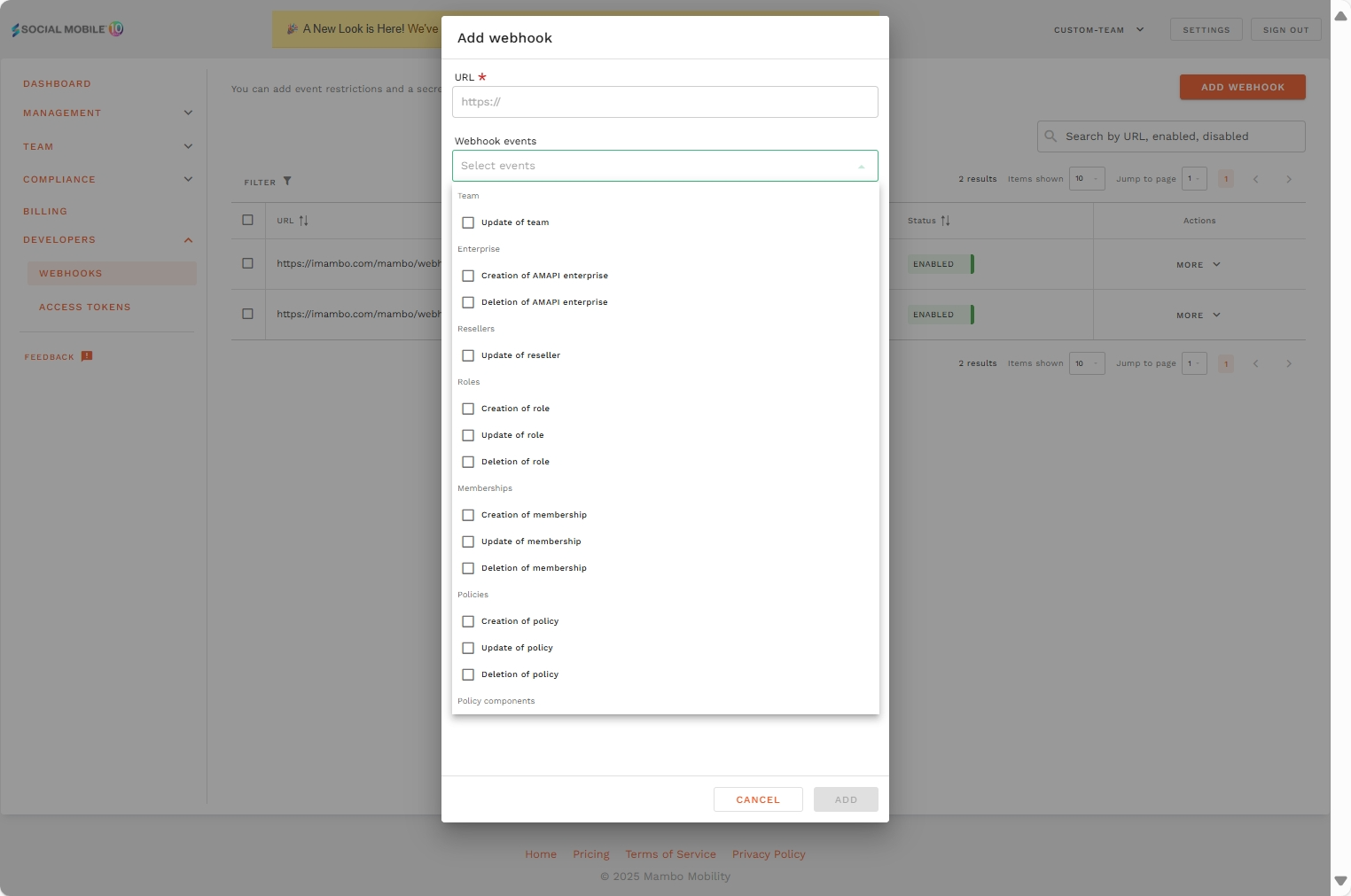
Managing Webhooks
Viewing and Editing
- Access the webhooks list to see all configured webhooks
- Click on any webhook to view its details and event history
- Use the edit function to modify webhook configuration
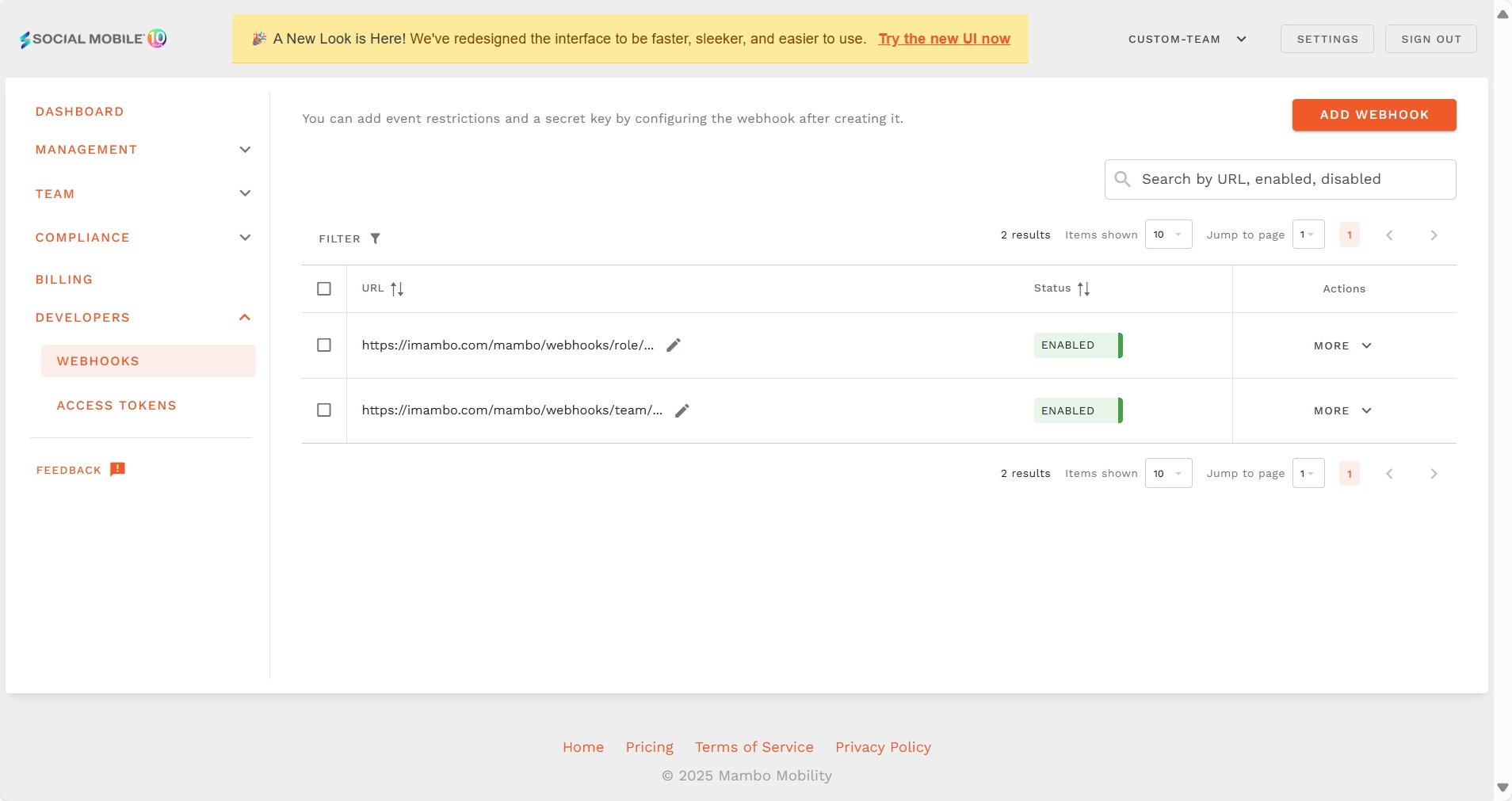
Webhook Events and Their Purposes
Team Management Events
Team Update: Triggered when team settings, branding (logo, colors), or organizational configuration changes. Useful for synchronizing team information with external systems.
Reseller Update: Fired when reseller information, pricing, or partnership settings are modified. Important for reseller management portals.
Enterprise Management Events
Enterprise Create: Notifies when a new enterprise customer is created in the system. Essential for CRM integration and customer onboarding workflows.
Enterprise Delete: Triggered when an enterprise is removed from the system. Helps maintain accurate records in external systems.
User and Access Management Events
Role Events
Role Create: Fired when a new role with specific permissions is created. Useful for permission synchronization.
Role Update: Triggered when role permissions, names, or settings are modified. Helps maintain consistent access controls.
Role Delete: Notifies when a role is removed from the system. Important for cleanup operations.
Membership Events
Membership Create: Triggered when a new user is added to the team. Perfect for user provisioning workflows.
Membership Update: Fired when user membership details, roles, or access levels change. Essential for access management.
Membership Delete: Notifies when a user is removed from the team. Important for deprovisioning processes.
Policy Management Events
Policy Events
Policy Create: Triggered when a new device policy is created. Useful for policy compliance tracking.
Policy Update: Fired when existing policy settings, rules, or configurations are modified. Helps maintain policy consistency.
Policy Delete: Notifies when a policy is removed. Important for compliance auditing.
Policy Component Events
Policy Component Create: Triggered when a new policy component is added. Useful for component inventory management.
Policy Component Update: Fired when policy component configurations, settings, or options change. Essential for configuration management.
Policy Component Delete: Notifies when a policy component is removed. Helps maintain accurate component records.
Device Management Events
Enrollment Events
Enrollment Token Create: Triggered when a new device enrollment token is generated. Perfect for device provisioning workflows.
Enrollment Token Update: Fired when enrollment token settings, expiration, or status change. Important for token lifecycle management.
Enrollment Token Delete: Notifies when an enrollment token is revoked or deleted. Essential for security monitoring.
Device Events
Device Enroll: Triggered when a new device successfully enrolls in the system. Crucial for device inventory management.
Device Update: Fired when device information, compliance status, or configuration changes. Essential for real-time device monitoring.
Device Delete: Notifies when a device is unenrolled or removed from management. Important for asset tracking.
API and Integration Events
Access Token Events
Access Token Create: Triggered when a new API access token is generated. Important for security monitoring and token inventory.
Access Token Update: Fired when access token permissions, scopes, or status change. Essential for access control auditing.
Access Token Delete: Notifies when an access token is revoked or deleted. Crucial for security incident response.
Webhook Security
HMAC Signature Verification
When you configure a webhook secret:
- mambo EMM generates an HMAC-SHA256 signature for each webhook payload
- The signature is included in the request headers
- Your application can verify the signature to ensure the webhook originated from mambo EMM
Security Best Practices
- Always use HTTPS endpoints to ensure webhook data is encrypted in transit
- Implement signature verification using the provided secret to validate webhook authenticity
- Validate incoming payloads to ensure they match expected formats
- Set up IP whitelisting if supported by your infrastructure
Note: Webhooks provide real-time access to sensitive team activities and data. Carefully consider which events to subscribe to and ensure your webhook endpoint is secure, authenticated, and can handle the expected volume of notifications. Regularly review and audit your webhook configurations to maintain security compliance.